The contemporary commercial landscape has shifted the competitive battleground from product features and pricing to the quality of the end-to-end Customer Experience (CX). Traditional customer support, defined by its reactive nature—waiting for a customer to initiate contact with a problem—is no longer sufficient to secure customer retention. Studies consistently demonstrate that acquiring a new customer costs significantly more than retaining an existing one, making customer retention an economic necessity and a core business strategy. The ultimate goal, therefore, is the conversion of routine support transactions into memorable, value-additive experiences that foster loyalty and advocacy. The Zoho unified Customer Experience (CX) platform, anchored by solutions such as Zoho CRM, Zoho Desk, and Zoho SalesIQ, provides the technological architecture necessary for this strategic transition. This article details three distinct, yet highly integrated, strategic paths—or pillars—that enterprises can implement using the Zoho ecosystem to achieve stellar CX and measurable improvements in retention metrics like Customer Lifetime Value (CLV) and Net Promoter Score (NPS).
Unified Customer Data (Zoho CRM)
The ability to be proactive relies entirely on a Unified Customer View—a single source of truth that integrates sales history, service tickets, website activity, and marketing engagement. Zoho CRM serves as the central data repository, unifying all touchpoints to provide agents with the necessary context.
360-Degree Context: Agents viewing a live chat or inbound ticket (via Zoho Desk integration) are immediately presented with the customer’s purchase history, recent web page views (via Zoho SalesIQ), open opportunities, and past support tickets. This ensures the customer never has to repeat information, reducing friction and maximizing the customer's perceived value of the interaction.
Predictive Retention Scoring (Zia AI): Zoho's embedded Artificial Intelligence, Zia, analyzes unified CRM data to identify behavioral indicators of churn (e.g., a drop in product usage, failure to log a service ticket within a critical period, or a recent negative Sentiment Analysis score). The system automatically flags these high-churn-risk accounts, allowing the dedicated Customer Success team to engage proactively.
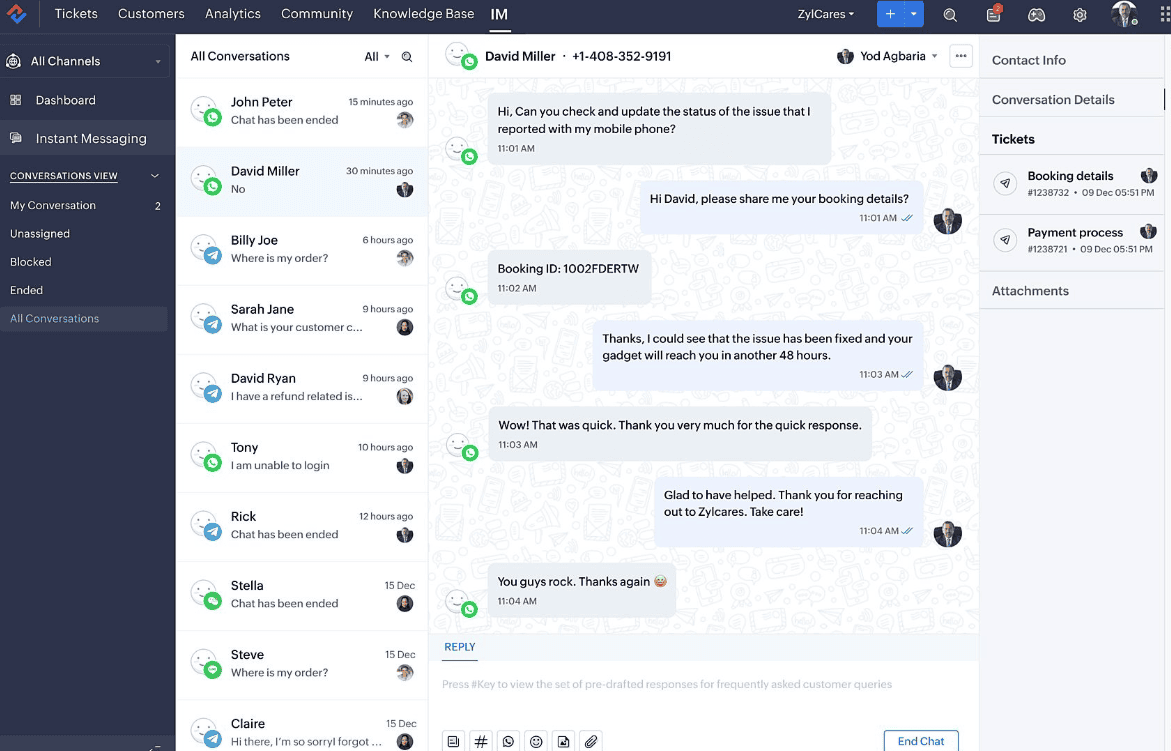
Proactive Intervention and Real-Time Context (Zoho SalesIQ)
Zoho SalesIQ converts the passive company website or web application into an active engagement channel, facilitating the critical shift from reactive support to proactive intervention.
Real-Time Visitor Tracking: SalesIQ tracks visitor activity, identifying current page, time spent, and referral source. When integrated with the CRM, it identifies the visitor's status (prospect, lead, or existing high-value customer).
Automated Proactive Chat Triggers: The system uses rules based on this real-time and historical context to trigger personalized, proactive chat invitations. Examples include:
Behavioral Trigger: An existing customer visits the "Cancel Subscription" page and lingers for 30 seconds. SalesIQ automatically initiates a chat: "I see you're checking out our subscription options. Can I quickly check in on your experience or answer any questions?"
Product Use Trigger: A customer repeatedly visits the knowledge base article for a known technical bug. SalesIQ initiates a chat, preemptively offering a remote support session via Zoho Assist integration.
This proactive approach converts potential frustration points (leading to churn) into high-touch service opportunities, demonstrating that the business anticipates and cares about their experience, rather than waiting for failure.
The Self-Service Revolution (Zoho Desk ASAP & Knowledge Base)
Modern customers overwhelmingly prefer to find solutions independently, provided the resources are accessible and accurate. Zoho Desk's self-service portal (branded as ASAP - Accelerated Service Assistance Platform) is the central vehicle for this strategy, significantly driving down the volume of Tier 1 support tickets and reserving human agent bandwidth for complex, relational issues.
Knowledge Base Centralization: The Desk Knowledge Base serves as the single repository for articles, FAQs, and video tutorials. Its effectiveness is augmented by AI-driven reporting that highlights which articles are successful in resolving issues and which topics require more content creation, ensuring continuous improvement.
Community Forums for Peer-to-Peer Support: The integrated community forum leverages the collective intelligence of the customer base. Customers can post questions, receive answers from peers, and vote on the best solutions. This not only offloads support volume but also fosters a sense of community and loyalty around the brand. Critical, verified answers can be seamlessly promoted to official Knowledge Base articles, closing the feedback loop.
Automated Support and Guided Conversations
Desk incorporates automation tools—Guided Conversations (rule-based chatbots) and Blueprint (process management)—that ensure even reactive support is efficient and guided, enhancing the overall experience.
Intelligent Ticket Routing: Blueprint enforces standardized processes for ticket handling. For example, a ticket tagged with "Billing" is automatically assigned to the Finance Support queue and set with the appropriate SLA, ensuring consistency in service delivery.
Contextual Agent Empowerment: Agents receive AI-driven sentiment analysis on incoming tickets, allowing them to prioritize emotionally urgent or negative interactions. This context is crucial for delivering empathetic, tailored service that transforms a negative experience into a positive retention moment.
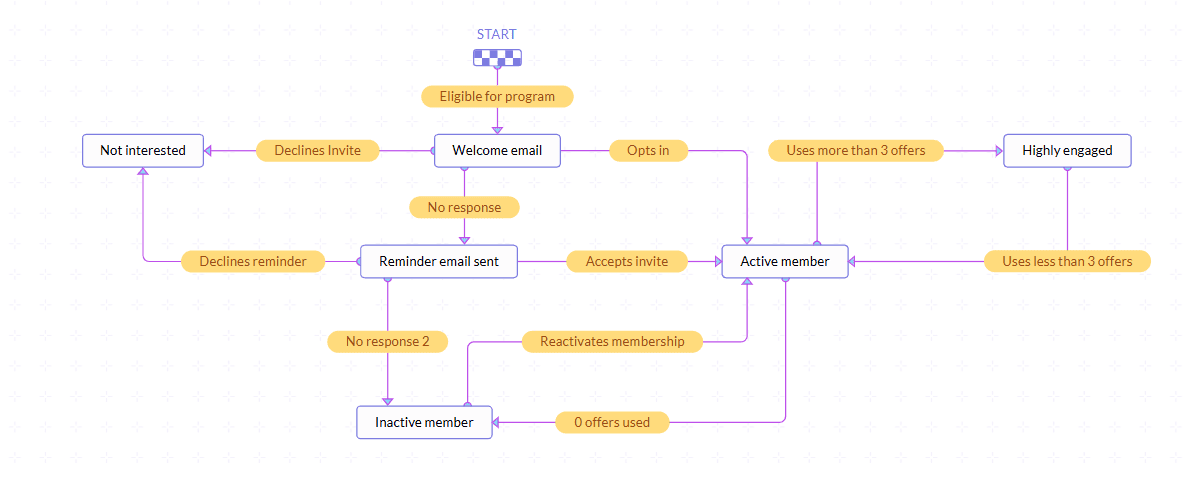
Mapping and Automating the Post-Sale Journey with the Customer Journey Orchestration Imperative (CommandCenter)
Customer experience is often compromised not by the front-line agent, but by the friction and handoffs between internal departments (Sales, Service, Billing, Onboarding). Zoho CRM's CommandCenter is the strategic tool used to visually map, design, and automate the entire post-sale customer journey, ensuring a coordinated, cohesive experience.
Visual Journey Mapping: CommandCenter allows leadership to graphically model the ideal customer path post-purchase (e.g., Purchase $\to$ Onboarding $\to$ First Milestone $\to$ Quarterly Check-in). This process makes friction points (where customers are likely to stall or churn) visible.
Cross-Functional Automation: The platform automates actions across multiple applications based on the customer’s movement through the defined journey states.
Example: When the CRM status changes from "Customer Onboarding - Phase 1 Complete," CommandCenter automatically:
Sends a personalized check-in email (via Zoho Campaigns).
Creates a "First Milestone Review" task for the Customer Success Manager (in CRM).
Updates the customer's portal access level (in Zoho Creator).
PathFinder Analysis: CommandCenter includes PathFinder, a tool that automatically tracks the actual paths customers take versus the ideal path. This visual analytics capability highlights where customers drop off or get stuck, providing continuous, data-driven optimization opportunities to plug churn "leaks."
Streamlining Contract and Financial Interactions (Zoho Sign & Billing)
Retention is often jeopardized by frustrating administrative steps. Integrating transactional apps ensures these moments are frictionless.
Frictionless Renewals (Zoho Sign): For businesses requiring annual contracts or service agreements, Zoho Sign integration ensures that renewal documents are sent, tracked, and legally executed entirely digitally. This eliminates paper-based friction that can delay renewal and introduce unnecessary customer annoyance.
Billing Transparency (Zoho Billing/Books): Providing customers with immediate, clear access to their invoices, payment history, and subscription details via the Customer Portal (accessible through Zoho Billing) ensures transparency. This is critical because unexpected charges or complex billing inquiries are primary drivers of involuntary churn.